Ensure reliable print production by detecting excessive ink coverage before it becomes a problem.
The PDF Ink & Coverage Inspector is designed for print workflows where controlling total ink coverage (TAC) is critical. Using Ghostscript as its rendering engine, the app analyzes PDFs at pixel level and calculates accurate ink coverage across CMYK or custom separations.
Excessive ink coverage can lead to a range of production issues:
Ink not drying properly
Set-off and smudging
Poor print quality
Press slowdowns or stops
Rejected jobs and costly reprints
These problems are often only discovered late in the process — sometimes even on press.
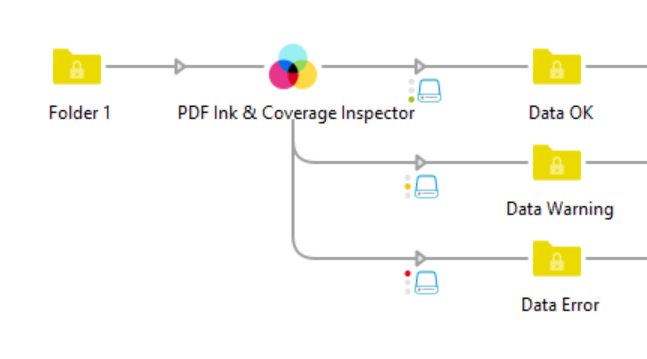
This app brings TAC validation directly into your Switch workflow, allowing you to detect and act on issues early:
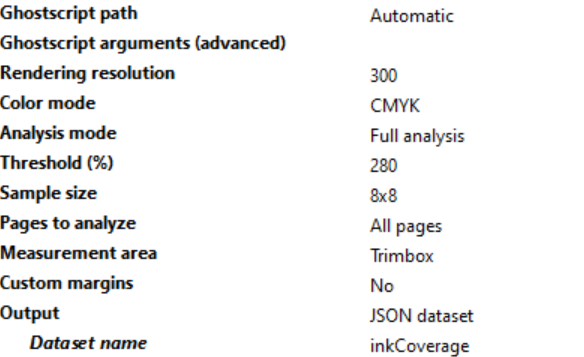
Automatically measure total ink coverage (TAC) per page
Detect threshold violations and route jobs accordingly (OK / Warning / Error)
Analyze CMYK, all separations, or custom ink sets
Focus on relevant areas only, such as TrimBox or BleedBox
Exclude margins or technical marks like crop marks from the analysis
Work with specific pages, including first, last, or custom ranges
Preflight validation
Automatically check incoming PDFs for excessive TAC before they enter production.
Print workflow automation
Route jobs with high ink coverage to correction workflows or notify operators.
Quality control
Ensure files meet press or substrate-specific TAC limits (e.g. coated vs uncoated stock).
Large format and packaging
Avoid ink-related issues in high-coverage designs where TAC is often exceeded.
Standardization across clients
Enforce consistent ink limits regardless of file origin.
The app uses Ghostscript for reliable, high-quality rendering and performs pixel-based analysis for accurate results. It integrates seamlessly into Enfocus Switch, making it easy to automate TAC checks at scale.