
×

Warning message

Ce contenu est uniquement disponible en anglais.

Phoenix Stocks

Buy now
Try it for free

About Phoenix Stocks

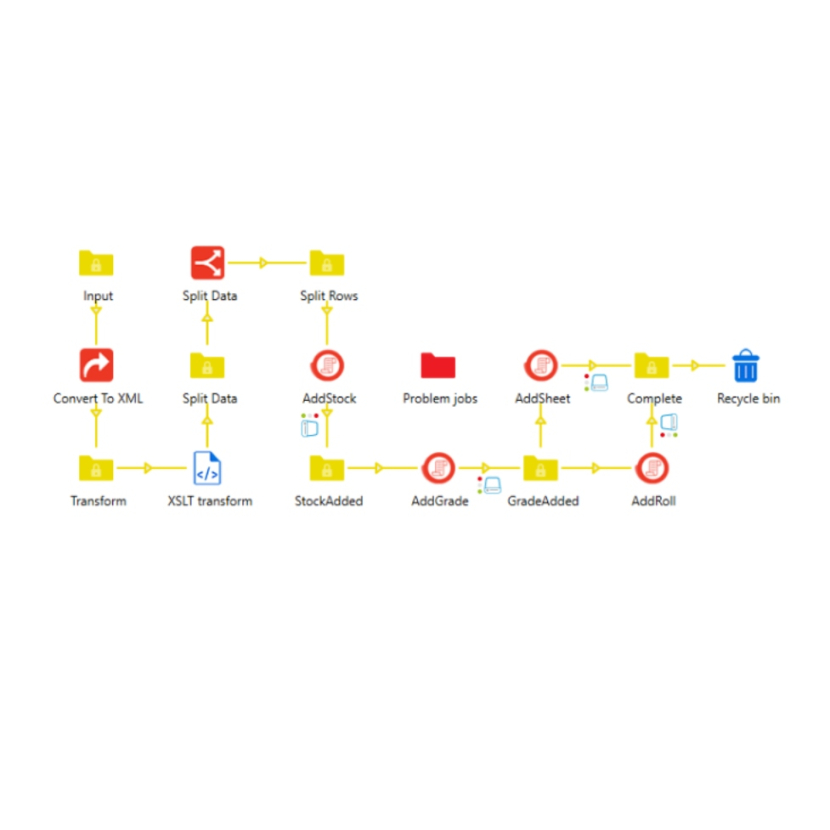
Phoenix Stocks connects Enfocus Switch directly to your Esko Phoenix stock library. Manage the stocks, grades, sheets, and rolls that drive your imposition jobs - automatically, from inside a flow.

What it does

Whether you're onboarding a new substrate, syncing materials from your MIS, or tidying up old entries, Phoenix Stocks lets you do it without clicking through the Phoenix interface. One configurator, every stock-library task.

Six actions, four targets

  • Find stocks, grades, sheets, or rolls that match your criteria
  • Check for an item and route the job based on whether it exists
  • Create new stocks - complete with inline grades, sheets, and rolls in a single step
  • Edit existing items, individually or in bulk
  • Duplicate a stock - clone it with all its grades, sheets, and rolls under a new name; clone many at once and indexed "-1", "-2", … suffixes keep names unique
  • Delete items that are no longer needed

Flexible, operator-based search

Look up items by Name, ID, External ID, Description, or Notes using familiar operators like Equals, Contains, and Starts With. Narrow results by parent stock or parent grade, or leave the filter blank to operate across the whole library.

Built for production flows

  • Every job produces a clean JSON result file you can branch on downstream
  • Errors come back as structured JSON too — no parsing log messages
  • Three-way routing: Success, Warning, and Error. The Warning route fires whenever the app's behavior diverged from your literal request - Override actually deleted data, a duplicate weight caused a skip, an "edit existing" fell back to creating a new entry, or a multi-match duplicate auto-suffixed names. Each divergence is listed in the result JSON so flows can react precisely.
  • Automatic retry when Phoenix is busy, so transient load doesn't stall the flow
  • Safe to run alongside other Phoenix-aware Switch apps - Phoenix Stocks coordinates API calls across them to prevent conflicts

Who it's for

Print operations and prepress teams who use Esko Phoenix for imposition and want to automate the repetitive parts of stock management — adding new materials as they arrive, keeping the library in sync with an upstream system, or simply removing entries that have gone out of use.

About Significans Automation

Significans Automation Inc. specializes in delivering next-generation automation to the Printing and Packaging industry. The company offers programming and expertise in custom workflow development, communication and project management, color management, prepress training, and end-to-end business integration. The company is driven by the conviction that customized automation is the only path forward.
Compatibility
Switch Version Required:25.11 or higher
Platform:Windows, Mac
3rd Party Compatibility:Esko Phoenix (Minimum version tested: 26.03 - may work on older versions)
Resources

App creator

Significans Automation
Support
+1-877-463-4465
Online support

App creator

Significans Automation
Support
+1-877-463-4465
Online support