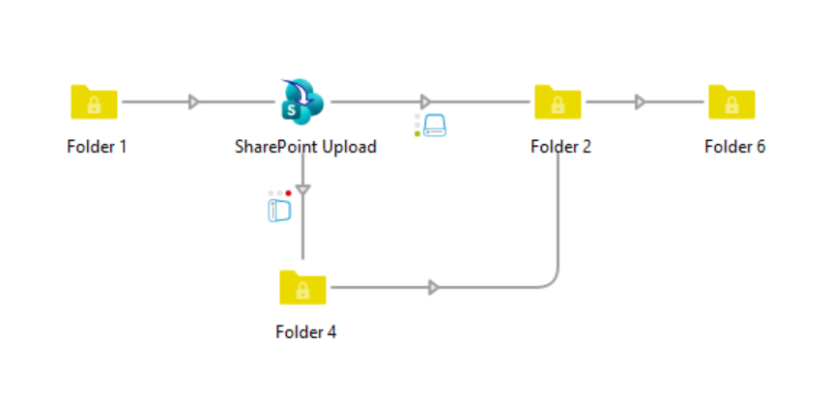
SharePoint Upload lets you upload files and folders directly from your Switch flow to a SharePoint document library or to a user's OneDrive — no separate connector or SDK required.
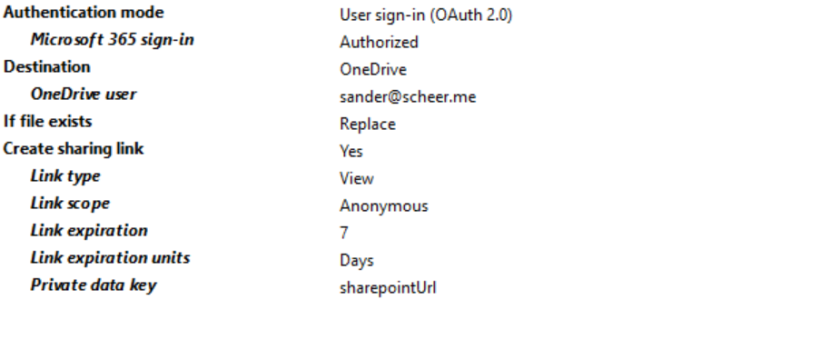
Choose the authentication model that fits your setup: app-only (client credentials) for fully unattended, server-to-server flows, or interactive Microsoft 365 sign-in for individual users — sign in once directly from Switch Designer, and Switch keeps the session refreshed automatically from then on.
Use it for a wide range of automation scenarios: deliver finished files straight to a client's SharePoint site, archive completed jobs to a central document library, or drop production files into a specific user's OneDrive for review.
Pick your target site and document library — or a specific user's OneDrive — from live, searchable pickers populated straight from your Microsoft 365 tenant, so there's no copying and pasting site URLs or library names by hand. Both individual files and complete folder structures are supported, with automatic resumable upload for larger files so nothing gets stuck partway through.
Control exactly what happens when a file already exists at the destination: replace it, have SharePoint rename it automatically, or fail the job so you can handle the conflict explicitly downstream.
Optionally generate a sharing link after upload — view or edit access, scoped to your organization or made anonymous, with an expiration date — and store it in the job's private data under a configurable key, making the uploaded file immediately accessible to downstream elements without exposing permanent credentials.